
Semester Project Webserver
Setup
This setup process will install the web app locally on your computer using a docker container.
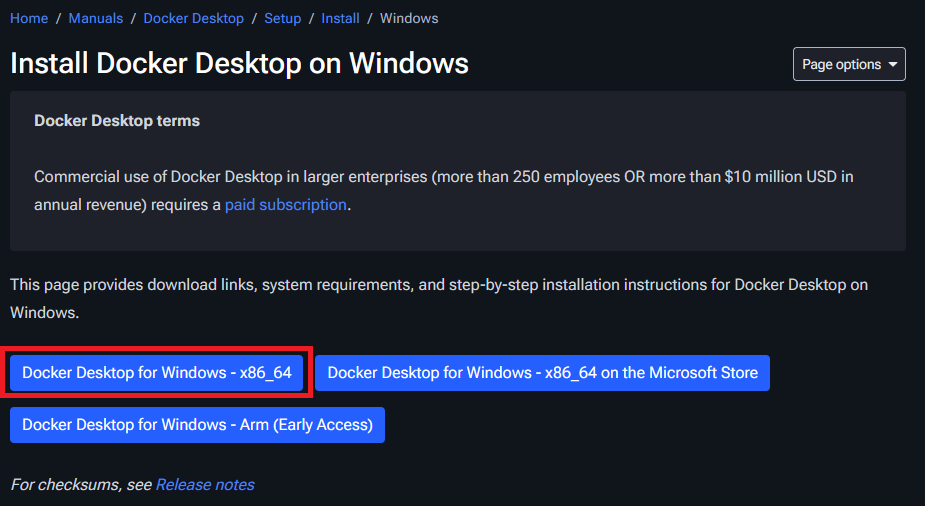
- Install Docker Desktop (Windows, Mac, Linux).
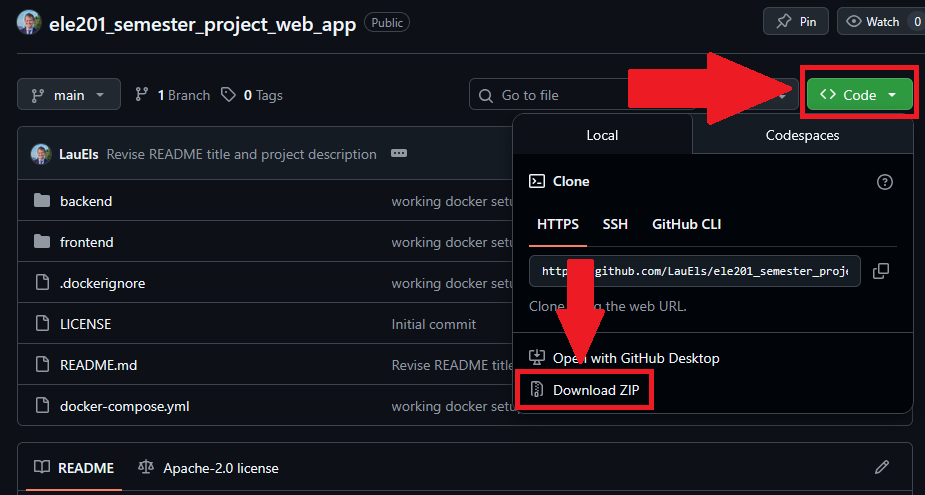
- Clone the github repository of the Web App. You can also download it as a zip file and unpack it.
- Open a terminal window (on Windows this is called Command Prompt)
- Navigate to the Web App using the
cd PATHcommand. Note:PATHhas to be replaced with an actual path, e.g.cd C:\Users\laure\Desktop\ele201_semester_project_web_app-main. - Run
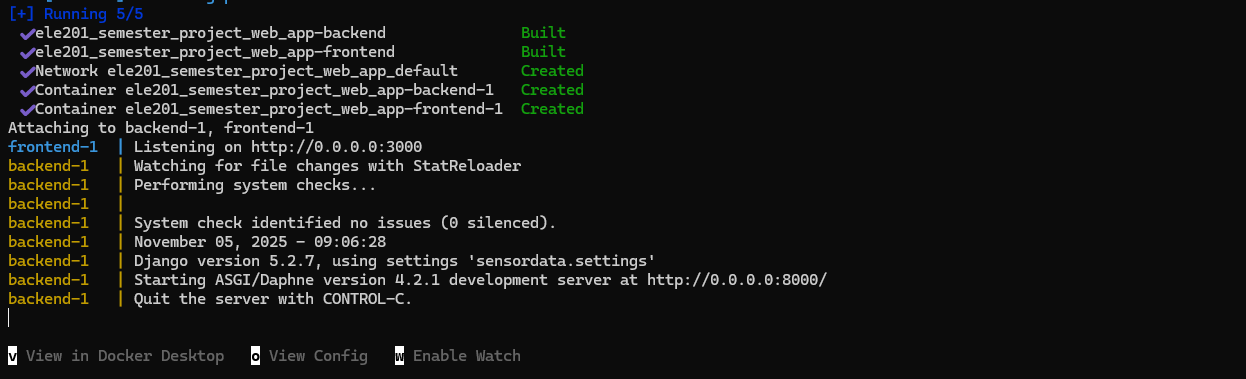
docker compose up --buildto build the docker container. Once it is finished the end of the output should look something like this:
- Close the terminal window
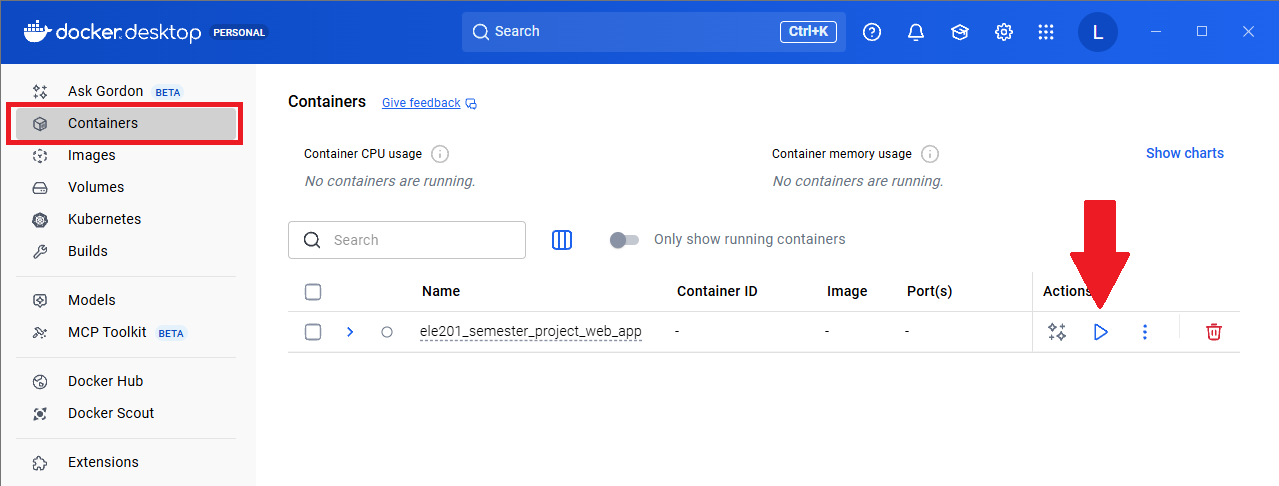
- Open Docker Desktop. Navigate on the left side to the Containers tab. You should have a container called ele201_semester_project_web_app. Press the play button to start the container.
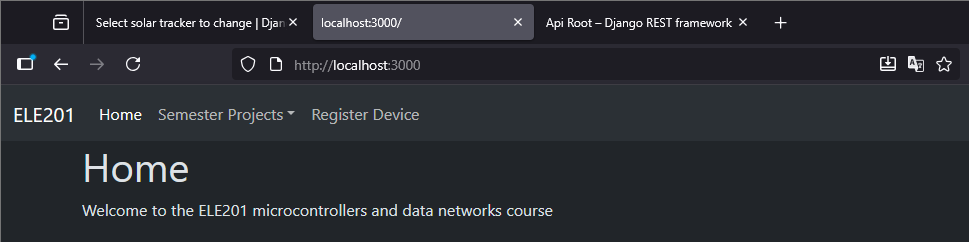
- The Web App should be reachable through you web browser under
http://localhost:3000/.
Webapp Walkthrough
Register Device
Before you send any data to the web server make sure you register you device:
- Startup the container through Docker Desktop.
- In a web browser open the web app which can be reached under
http://localhost:3000/. - Navigate to Register Device on the top of the home page.
- Enter the MAC address of your device and give it a name. The MAC address has to be in the format XX-XX-XX-XX-XX-XX, where X is a hexadecimal value. Note: It doesn’t really matter which MAC address you enter here, just make sure you use the same value when sending data to the web server later on.
Data Visualization
After registering a device you can navigate to the page of your semester project. In the dropdown menu Device Name you should be able to find your device. Select it. This page will visualize your data as soon as you send it through POST request from your microcontroller.
API
To look at the api navigate to http://localhost:8000/api/. Here you can see the different project APIs available. You can see the keys and value types that your POST requests need to include by navigating to the api of your project, e.g. for the piano project navigate to http://localhost:8000/api/piano/.
Retrieving Data from the Microcontroller
Here is an example code in python on how to use a GET request to retrieve data from the server running on the microcontroller. Note: The ip address 192.168.182.11 is the address of my microcontroller. Yours might be different.
import requests

# Define the URL for the GET request
url = "http://192.168.182.11/api/leds"  # Change to the IP address of your microcontroller

try:
    # Make the GET request
    response = requests.get(url)

    # Check if the request was successful (status code 200)
    if response.status_code == 200:
        print(f"Successfully retrieved data from {url}")
        data = response.json()
        # Print the content of the response
        print("Response content:")
        print(data)
        print("The value of user_btn:")
        print(data["user_btn"])
    else:
        print(f"Failed to retrieve data. Status code: {response.status_code}")

except requests.exceptions.RequestException as e:
    print(f"An error occurred: {e}")
Sending Data to the Web Server
Here is an example code in python on how to send a POST request to the Web Server running on your computer. Note: The ip address is localhost because the server is running on the same computer that I’m running this script on.
import requests
import json

# Define the URL of the endpoint you want to send the POST request to
url = 'http://localhost:8000/api/piano/'

# Prepare the data you want to send (e.g., a dictionary that will be converted to JSON)
payload = {
    'mac_address': 'C0-25-A5-27-28-B0',
    'note': 'e'
}

# Set the headers, especially Content-Type if sending JSON
headers = {
    'Content-Type': 'application/json'
}

try:
    # Send the POST request
    response = requests.post(url, data=json.dumps(payload), headers=headers)

    # Check the response status code
    if response.status_code == 201:
        print("POST request successful!")
        print("Response:", response.json()) # Assuming the response is JSON
    else:
        print(f"POST request failed with status code: {response.status_code}")
        print("Response:", response.text) # Print the raw response if not JSON

except requests.exceptions.RequestException as e:
    print(f"An error occurred: {e}")
Example Script
In this example the script running on your computer is making GET requests to the server on the microcontroller. Whenever the button on the microcontroller is pressed, it will choose a random note and make a POST request to the web server.
The ip address of the microcontroller I’m using is 192.168.182.11 and the address of the web server is localhost or 127.0.0.1 since it is running on my computer.
import requests
import json
import random
import time

microcontroller_url = "http://192.168.182.11/api/leds"  # Change to the IP address of your microcontroller
web_server_url = 'http://localhost:8000/api/piano/' #Change to the api link of your project
mac_address = 'C0-25-A5-27-28-B0' #Change to the mac address you specified when registering the device in the web app
btn_pressed = False
send_note = False
notes = ['c', 'd', 'e', 'f', 'g', 'a', 'b']

while True:
    try:
        # Make the GET request
        response = requests.get(microcontroller_url)

        # Check if the request was successful (status code 200)
        if response.status_code == 200:
            # print(f"Successfully retrieved data from {microcontroller_url}")
            data = response.json()

            if data["user_btn"] == "PRESSED":
                if not btn_pressed: send_note = True
                else: send_note = False
                btn_pressed = True
            if data["user_btn"] == "RELEASED":
                btn_pressed = False
                send_note = False
        else:
            print(f"Failed to retrieve data. Status code: {response.status_code}")

    except requests.exceptions.RequestException as e:
        print(f"An error occurred: {e}")

    if send_note:
        # I choose a random note because I only have one button
        random_note = random.choice(notes)

        # Prepare the data you want to send (e.g., a dictionary that will be converted to JSON)
        payload = {
            'mac_address': mac_address,
            'note': random_note
        }

        # Set the headers, especially Content-Type if sending JSON
        headers = {
            'Content-Type': 'application/json'
        }

        try:
            # Send the POST request
            response = requests.post(web_server_url, data=json.dumps(payload), headers=headers)

            # Check the response status code
            if response.status_code == 201:
                print("POST request successful!")
                print("Response:", response.json()) # Assuming the response is JSON
            else:
                print(f"POST request failed with status code: {response.status_code}")
                print("Response:", response.text) # Print the raw response if not JSON

        except requests.exceptions.RequestException as e:
            print(f"An error occurred: {e}")

    time.sleep(0.1)